A desktop workspace for the coding agents you already use.
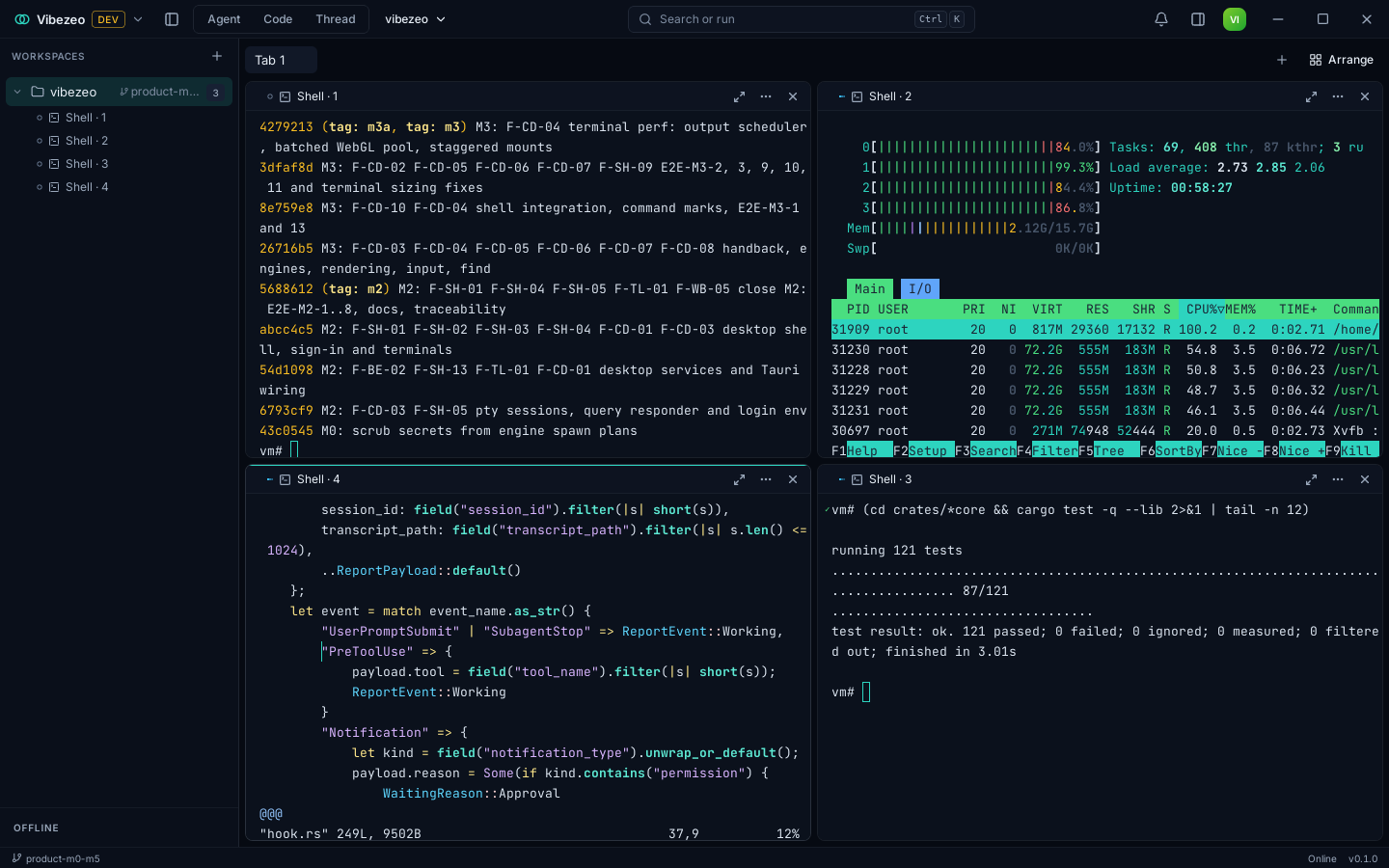
Vibezeo runs Claude Code, Codex, Gemini CLI and other coding-agent CLIs side by side in real terminals, on your own subscriptions. One Dashboard shows every agent: what it's doing, and when it needs you.
Free for Linux. No account needed: it runs on your computer.
- milestones in the 0.1.0 release
- 6
- automated tests in its code
- 862
- end-to-end suites on the real app
- 42
- coding agents supported
- 11
Built so far. See the changelog →
See it run
Vibezeo in 1 minute
Built with Claude
Made for Claude Code, open to every agent
Vibezeo gives Claude Code a persistent workspace: run several sessions at once, see which one needs you, and pick up where you left off after a restart, all on your own Claude subscription.
- Shipped
Claude Code, integrated first
Claude Code is the engine Vibezeo integrates most deeply. Vibezeo installs Claude Code's own hooks in a separate home for each account, so it knows exactly when a session starts, runs a tool, needs you or finishes. After a restart it reopens the same Claude Code session with --resume.
- How we build
Built with Claude Code
Vibezeo is built with Claude Code. Most of the code, including the desktop app, the backend, this site and their tests, was written with it, and the commit history records it.
- Built, live when accounts open
Hosted features on the Claude API
Vibezeo's hosted AI runs on the Claude API. Session titles and Enhance and Polish for dictated prompts are built: the backend calls Claude, meters credits, and stores no prompts or responses. They go live when accounts open, alongside Thread mode and Dictate in the app. Teammate drafts and the Auto supervisor come next.
Working today
Built for running many agents at once
Real terminals, side by side
Each agent runs in a real PTY pane over your own folders. Split, maximize and rearrange panes into layouts. Full-screen TUIs, colours and mouse input behave as they do in your usual terminal.
Your accounts, untouched
Each engine signs in by itself, inside its own provider home on your disk. Vibezeo never reads, copies or proxies an AI vendor's tokens.
Live status for every agent
Vibezeo knows when an agent is working, waiting for you, done or has failed, from Claude Code's hooks and from each engine's own output. The status shows on every pane and in the sidebar.
One Dashboard
Every live agent in one place, across all your workspaces: what each one is doing and which ones are waiting for you. One click jumps to the pane that needs you.
Notifications that matter
You get an OS notification when an agent needs you or finishes, plus an in-app history. Nothing pings you for the pane you're already looking at.
Crash-safe restore
Layouts, tabs and panes come back after a quit or a crash. Agents return paused, ready to resume their session, and nothing re-runs on its own. We test this by force-killing the app at random points.
Signed updates
Updates are signature-checked before they install. An older or tampered build is refused.
Private by default
Usage statistics and crash reports are off until you turn them on. Secrets live in your OS keychain, and logs are scrubbed of tokens and keys.
Engines
Bring the agents you already use
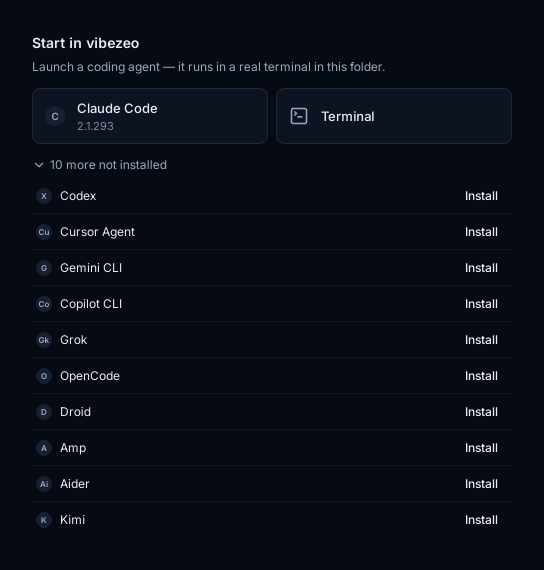
Vibezeo finds the engine CLIs installed on your machine and launches them in panes, each signed in to your own account. If an engine is missing, Vibezeo shows you how to install it.
- Claude Code
- Codex
- Gemini CLI
- Copilot CLI
- Cursor Agent
- Grok
- OpenCode
- Droid
- Amp
- Aider
- Kimi
Product names belong to their owners. Vibezeo isn't affiliated with or endorsed by any engine vendor.
Principles
What we won't compromise on
Your machine, your accounts
Nothing leaves your machine unless you opt in, and engine tokens are never touched.
Reliability first
Correct terminal behaviour, restore after a crash, and no silent failures.
Explicit authority
Vibezeo never answers an agent's request on your behalf, and spending always asks first.
One codebase
The goal is that Linux, macOS and Windows get the same features on the same day. Linux is first.
Roadmap
What we're building next
- 01
Lanes, presets and handoff
Run one task across several engines, each in its own git worktree, then compare and hand work from one to another.
- 02
Accounts and usage
Keep work and personal accounts for each engine apart, each signed in by itself, with usage and limits in view.
- 03
Thread mode
Read a coding session as a conversation instead of watching a TUI, with inline approvals and a changes panel.
- 04
Dictate
Push-to-talk anywhere in the app, with speech recognized on your machine.
- 05
Files, git and a browser
Your files, diffs and a preview browser beside the agents.
- 06
Teammates (Agent mode)
Persistent agents with memory, skills and routines that can message each other.
- 07
Tasks, routines and plugins
A local task tracker agents can read and write, scheduled routines, and connected services behind explicit approvals.
- 08
Remote
Run agents over SSH and WSL, and check on them from your phone.
Team
Who's building Vibezeo
Founder, Vibezeo
An engineer focused on building products and shipping meaningful software. Naman Jain started Vibezeo because, as coding agents multiply, developers need a better way to run, coordinate and keep an eye on them.
More about Vibezeo →Pricing
Free to run your agents
Free
$0forever
Run your own coding agents side by side.
Pro
$29per month, or $290 a year
For developers who run many agents every day.
Team
$49per seat per month, or $490 a year · 2 seats minimum
For teams that share agents, policy and credits.
Free is available today; Pro and Team start with Vibezeo accounts. Your agents always run on your own subscriptions. Compare the plans →
FAQ
Questions
- Can I use Vibezeo today?
- Yes. Download Vibezeo 0.1.0 for Linux from the download page. It runs the Free plan on your computer with no account, and doesn't contact our servers.
- How does Vibezeo use Claude?
- Claude Code is the engine Vibezeo integrates most deeply, and Vibezeo itself is built with Claude Code. Its hosted AI features run on the Claude API: session titles and Enhance and Polish are built, and go live when accounts open.
- Which platforms does it support?
- Linux x86-64, as a .deb for Debian and Ubuntu.
- Does Vibezeo see my API keys or subscription tokens?
- No. Each engine CLI signs in by itself, in its own folder on your disk. Vibezeo starts the CLI and shows its terminal, and never reads, copies or forwards the engine's credentials.
- Do I need a new AI subscription?
- No. Vibezeo runs the coding agents you already have, on your existing plans.
- What will it cost?
- Free is $0. Pro is $29 a month and Team is $49 per seat a month; they start with Vibezeo accounts. The plans are on the Pricing page.
Try it on your own projects
Download Vibezeo for Linux, then tell us what works and what doesn't at hello@vibezeo.com.